FREE! A handy web browser extension/add-on to turn document body contentEditable on or off.
* Pencil icon used in this extension was downloaded from http://openclipart.org
Download WES 1.0 for Firefox
Download WES 1.0 for Chrome
 GGshow reloaded
FREE! A handy web browser extension/add-on to turn document body contentEditable on or off.
* Pencil icon used in this extension was downloaded from http://openclipart.org
Download WES 1.0 for Firefox
Download WES 1.0 for Chrome
When ASP CInt( ( 0.3 - 0.2 ) * 10 ) gives you 1, but PHP (int) ( ( 0.3 - 0.2 ) * 10 ) gives you 0;
When MySQL SELECT CAST( 3 * ( 1.0 / 3 ) AS SIGNED ) gives you 1, but MSSQL SELECT CAST( 3 * ( 1.0 / 3 ) AS INT) gives you 0;
How accurate the result you can expect from your web application?

When your web application is built on top of the myth of the floating point, you can’t even expect 0.1 from JavaScript (0.3-0.2), it gives 0.09999999999999998…
To remove http://, https://, ftp://, sftp://, www…
echo preg_replace('#^[^:/.]*[:/]+(www.)?#i','',$url);
Examples:
function strip_url($url){
  return return preg_replace('#^[^:/.]*[:/]+(www.)?#i','',$url);
}
echo strip_url('http://www.ggshow.com');
echo strip_url('https://www.ggshow.com');
echo strip_url('ftp://www.ggshow.com');
echo strip_url('sftp://www.ggshow.com');
echo strip_url('http://ggshow.com');
echo strip_url('http:/www.ggshow.com');
echo strip_url('http:www.ggshow.com');
echo strip_url('http:ggshow.com');
echo strip_url('HTTP://WWW.ggshow.com');
echo strip_url('anything://www.ggshow.com');
echo strip_url('anything//www.ggshow.com');
echo strip_url('//www.ggshow.com');
echo strip_url('/www.ggshow.com');
Every echo statement above will output ggshow.com
Description:
jQuery Windows is a jQuery plugin to build web application platform in web based Windows interface.
License:
Screenshot:

Requirements:
Demo:
Usage:
<script src="//ajax.googleapis.com/ajax/libs/jquery/1.8.0/jquery.min.js"></script>
<script src="//ajax.googleapis.com/ajax/libs/jqueryui/1.8.23/jquery-ui.min.js"></script>
<link rel="stylesheet" href="http://ajax.googleapis.com/ajax/libs/jqueryui/1.7.2/themes/eggplant/jquery-ui.css" type="text/css" />
<script src="jquery.windows.min.js"></script>
<link rel="stylesheet" href="jquery.windows.css" type="text/css" />
$().windows();
or startup with parameters
$().windows({
    data : 'jquery.windows.json',
    config : {
        backgroundColor:'#000',
        backgroundImage:'wallpaper.jpg',
        backgroundOption:'fill',
        startupFullscreen:false,
        shutdownExitFullscreen:true,
        showFullscreenButton:true,
        showShutdownButton:true
    },
    startupHandler : startup,
    shutdownHandler : shutdown
});
Parameters:
Parameters are optional.
startup and/or shutdown function must be exist if startupHandler and/or shutdownHandler is defined.
Data Format:
Web applications and categories data for jQuery Windows stored in JSON data.
Example:
{
    "CATEGORY":[{
        "TITLE":"Category 1",
        "ITEM":[{
            "TITLE":"Application 1-1",
            "PATH":"app11.html"
        },{
            "TITLE":"Application 1-2",
            "PATH":"app12.html",
            "ICON":"gpl.png",
            "WIDTH":"400",
            "HEIGHT":"300",
            "RESIZABLE":"FALSE",
            "SCROLLING":"FALSE",
            "AUTOSTART":"FALSE"
        }]
    },{
        "TITLE":"Category 2",
        "ITEM":[{
            "TITLE":"Application 2-1",
            "PATH":"app21.html",
            "ICON":"app21.png"
        },{
            "TITLE":"Application 2-2",
            "PATH":"app22.html",
            "ICON":"app22.png"
        }]
    }]
}
Parameters are optional.
Detail parameters for separate application window please refer to data format in demo.
Full screen function & button is available only for web browsers which support JavaScript requestFullscreen method.
Download:
Description:
License:
Screenshot:
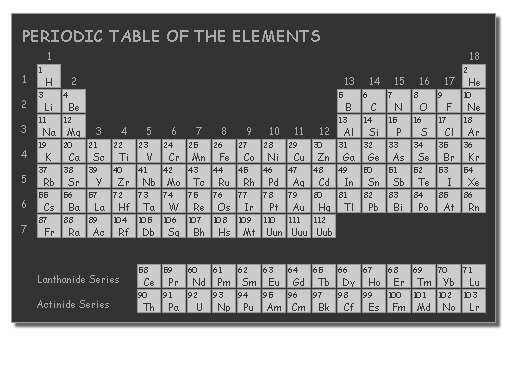
Demo:
Source:
<!DOCTYPE html>
<html>
    <head>
        <title>JQuery - Periodic Table of Elements - Element Selector</title>
        <link rel="stylesheet" type="text/css" href="jquery.pte.dark.css" />
        <script src="https://ajax.googleapis.com/ajax/libs/jquery/1.7.2/jquery.min.js"></script>
        <script src="http://jquery-pte.googlecode.com/files/jquery.pte.min.js"></script>
    </head>
    <body>
        <input type="text" id="element" name="element" readonly="readonly" onfocus="show_pte()" />
        <br>
        <label for="element">
            <span style="font-size:small;color:#AAA;">Click to select element.</span>
        </label>
        <br><br>
        <script>
            function select_element(element){
                $('.periodic_table').remove();
                $('#element').val(element.ATOMIC_NUMBER);
            }
            function show_pte() {
                $('<div>').addClass('periodic_table').appendTo('body').pte({
                    data : 'jquery.pte.lite.json',
                    config : {
                        x:$('#element').position().left,
                        y:$('#element').position().top,
                        tooltip:false,
                        closable:true,
                        size:24,
                        spacing:1
                    },
                    clickHandler : select_element
                });
            }
        </script>
    </body>
</html>
/*
* jquery.pte.dark.css
* v1.0
*/
.pte_table,.pte_element,.pte_detail {
    box-sizing: border-box;
    ms-box-sizing: border-box;
    webkit-box-sizing: border-box;
    moz-box-sizing: border-box;
    font-family: cursive;
    padding: 0;
}
.pte_table {
    box-shadow: 4px 4px 2px #666;
    border: #999 1px solid;
    background-color: #333;
}
.pte_element {
    border: #999 1px solid;
    background-color: #CCC;
}
.pte_element:hover {
    background-color: #FFF;
}
.pte_title {
    font-size: 1.0em;
    color: #AAA;
}
.pte_label {
    font-size: 0.6em;
    color: #AAA;
}
.pte_number {
    font-size: 0.5em;
    color: #333;
}
.pte_symbol {
    font-size: 0.6em;
    color: #333;
    text-align: center;
}
.pte_close {
    font-size: 0.8em;
    color: #999;
}
.pte_detail {
    background-color: #FFF;
    border: #CCC 1px solid;
    font-size: 0.7em;
    padding: 8px;
}
.pte_detail_label {
    float: left;
    clear: left;
    color: #333;
}
.pte_detail_value {
    float: left;
    clear: right;
    color: #666;
}
Parameters:
Download:
More examples: (view source to see the source code)
zf create module <moduleName>
zf create db-table <className> <tableName> <moduleName>
zf create model <mapperName> <moduleName>
zf create controller <controllerName> index-action-included[=1] <moduleName>
zf create form <formName> <moduleName>
zf create action <actionName> <controllerName>[=Index] view-included[=1] <moduleName>
zf create view <controllerName> <actionName> <moduleName>
To get the view object
$view = $this;
$view = $this->view;
$this->bootstrap(‘view’);
$view = $this->getResource(‘view’);
$this->getBootstrap()->bootstrap('view');
$view = $this->getBootstrap()->getResource('view');
To get layout object
$layout = $this->layout()
$layout = $this->_helper->layout()
$layout = $this->_helper->getHelper(‘Layout’)->getLayoutInstance()
$layout = $bootstrap->getResource(‘Layout’);
$layout = Zend_Layout::getMvcInstance();
To assign variable to layout object
$layout->var = ‘value’;
$layout->assign(‘var’, ‘value’);
To enable or disable layout
$layout->enableLayout();
$layout->disableLayout();
To enable or disable layout using CLI
zf enable layout
zf disable layout
zf show < config | manifest | phpinfo | profile | project.info | version >
zf create project <projectName>
zf enable layout
zf create db-table <className> <tableName>
zf create model <mapperName>
zf create controller <controllerName>
zf create form <formName>
zf create action <actionName> <controllerName>
zf create view <controllerName> <viewName>
user@ubuntu:~$ zf ?
Zend Framework Command Line Console Tool v1.11.11
Usage:
    zf [--global-opts] action-name [--action-opts] provider-name [--provider-opts] [provider parameters ...]
    Note: You may use "?" in any place of the above usage string to ask for more specific help information.
    Example: "zf ? version" will list all available actions for the version provider.

Providers and their actions:
 Version
    zf show version mode[=mini] name-included[=1]
    Note: There are specialties, use zf show version.? to get specific help on them.

 Config
    zf create config
    zf show config
    zf enable config
    Note: There are specialties, use zf enable config.? to get specific help on them.
    zf disable config
    Note: There are specialties, use zf disable config.? to get specific help on them.

 Phpinfo
    zf show phpinfo

 Manifest
    zf show manifest

 Profile
    zf show profile

 Project
    zf create project path name-of-profile file-of-profile
    zf show project
    Note: There are specialties, use zf show project.? to get specific help on them.

 Application
    zf change application.class-name-prefix class-name-prefix

 Model
    zf create model name module

 View
    zf create view controller-name action-name-or-simple-name module

 Controller
    zf create controller name index-action-included[=1] module

 Action
    zf create action name controller-name[=Index] view-included[=1] module

 Module
    zf create module name

 Form
    zf enable form module
    zf create form name module

 Layout
    zf enable layout
    zf disable layout

 DbAdapter
    zf configure db-adapter dsn section-name[=production]

 DbTable
    zf create db-table name actual-table-name module force-overwrite
    Note: There are specialties, use zf create db-table.? to get specific help on them.

 ProjectProvider
    zf create project-provider name actions
Related Articles: