FREE! A handy web browser extension/add-on to turn document body contentEditable on or off.
* Pencil icon used in this extension was downloaded from http://openclipart.org
Download WES 1.0 for Firefox
Download WES 1.0 for Chrome
 GGshow reloaded
FREE! A handy web browser extension/add-on to turn document body contentEditable on or off.
* Pencil icon used in this extension was downloaded from http://openclipart.org
Download WES 1.0 for Firefox
Download WES 1.0 for Chrome
user@ubuntu:~$ php -v
PHP 5.3.6-13ubuntu3.6 with Suhosin-Patch (cli) (built: Feb 11 2012 02:17:16)
Copyright (c) 1997-2011 The PHP Group
Zend Engine v2.3.0, Copyright (c) 1998-2011 Zend Technologies
    with Xdebug v2.1.0, Copyright (c) 2002-2010, by Derick Rethans
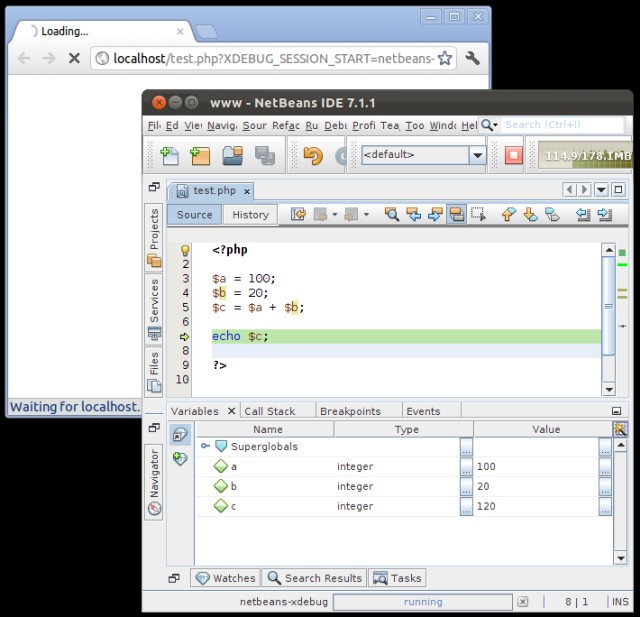
To control debugger session
Finish Debugger Session (Shift+F5)
Continue (F5)
Step Over (F8)
Step Into (F7)
Step Out (Ctrl+F7)
Run to Cursor (F4)
or use the buttons in Debug Toolbar
Google Chrome now has extensions, and GG now want to have create some Google Chrome extensions ^^
By referring to the Getting Started tutorial and samples on Google Code Labs, I’ve created my first Google Chrome “Hello, World!” extension. It was much easier than expected.
Steps:
{
  "name": "My First Extension",
  "version": "1.0",
  "description": "The first extension that I made.",
  "browser_action": {
    "default_icon": "icon.png"
  },
  "permissions": [
    "http://api.flickr.com/"
  ]
}
 menu and choose Extensions.
 .
....
"browser_action": {
"default_icon": "icon.png",
"popup": "mypage.html"
},
...
I’m planning to create some Google Chrome extension, but for now still need to sort my bunch of idea.
Below is an working example mygc_ext01 where mypage.html contains code to retrieve and display some picture from flickr.
Download:
Google Chrome extension sample code
Reference:
Getting Started: Building a Chrome Extension